Subscribe:

Labels

Showing posts with label helpful. Show all posts

Friday, June 11, 2010

Rooting Your G1


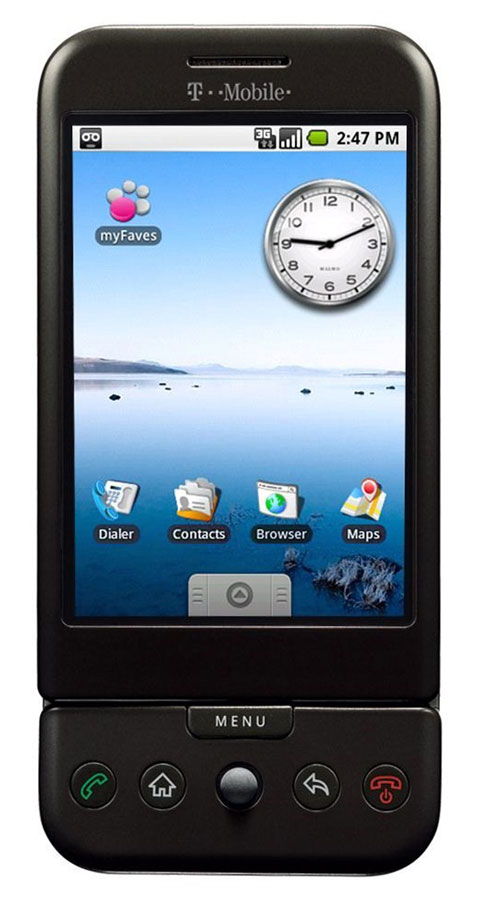
          Hello everyone, I just recently bought my first android phone, which turns out to be the G1.  Sadly, it is seen as outdated (as said by the android team themselves); however hope is not lost because thanks to people over at cyanogen, you can bring new life into your "old" phone.  Rooting an android phone is nothing new that only highly skilled computer techs know how to do, and can be done fairly quickly but there is always confusion on how to start.  Here I


Monday, February 22, 2010

New Mini Power Plant In A Box


Thought that this invention was worth noting.  If endorsed right and works like it should, we could very well see these in our backyards in 3 to 5 years.  Please leave any comments below.


Wednesday, February 17, 2010

Mac Hints


          If you are a mac user this site is something you need to know about.  There are tips that are updated constantly throughout every day and some you may have already known, but others you will be surprised to learn.  One of the most useful tips that surprised me was the ability to use your Facebook chat with iChat.  All you have to do is setup a few quick things with the iChat server, and you are done. Each post


Saturday, February 13, 2010

Quick Tip For Safari Browser Users


          If you didn't know, there is a way to download different parts from a website using Safari.  Such as an image, .GIF animation, .SWF animation or even a video.  If you click on "Window" in the top menu bar and then "Activity", you will see all of the contents of the website(s) you are looking at.  It may not seem useful, but it is a great simple way to download a video from a site such as Youtube.  When


Tuesday, February 9, 2010

Erase Your Entire Hard Drive With Full Confidence


          I've been helping out some of my friends with their computers, which they were getting ready to sell and came across Kill Disk.  With Kill Disk you can be sure that the files on your hard drive are erased well enough, so that no one can recover them.  Great for any computers that may have very personal information on it.  It should work with just about any computer, no matter the operating system or size of hard drive.  There are different versions, including a free version that allows you to do a one pass zero method.  You also get updates from Kill Disk free as well.  If you chip in some money for the paid version, you can do up to 99 passes on your hard drive (making your data harder to recover) and it writes over your drive with algorithm's that support 17 security standards.


Friday, January 22, 2010

Learn To Create Your Own Web page With Ease


          Creating my own website has been something i've always wanted to do.  And I have started but have had a lot of trouble because of my little experience with html coding.  While looking around for help on various websites, I stumbled upon W3Schools.  I was amazed on the helpful tips that were given, as well as all of the coding examples you can try for yourself.  It is a completely free site that teaches you HTML, XHTML, Javascript, DTD, and much much more.  It has helped me so much because I was having trouble with flash videos and after going to that site, the problem was solved.  
          You don't even need to use your own HTML code software with some of the tutorials.  There are numerous of "Try-it-yourself" examples that allow you to use their online text editor to test out things before putting it onto your website.  So if you put a little time into reading some information from the site you will be able to create your own website like a pro.  Now when you create an amazing website, don't forget to mention who told you about the site (just kidding).  
          So go on and design your personal web page.  You don't even need a fancy HTML code software, you can start it in a simple text editor.  For Windows users: Notepad and for Mac users: TextEdit.  Just save the file as .html and there you go.  Here's the link: W3Schools Thanks for reading and if you have any questions or comments please feel free to leave them.


Sunday, January 17, 2010

GDGT, The Gadget Forums.


          Recently I discovered this gadget site that offers information on all types of devices.  Computers, GPS systems, external hard drives and much more are found here.  You will find plenty of details and even help discussions on various gadgets.  You can either search for a certain thing or browse by different categories or companies.  Also, if you don't see your device listed you have the option to submit it to be added to the site.  That way you can get the help you need, hopefully quickly.  Check it out for yourself, I found it quite interesting.  Here's the link GDGT
          The site has user reviews which are great when your are looking to purchase a product, but know little about it.  Please leave comments on what you think of it and if you know of any sites like it, I'd love to know.  Thanks for reading and I hope you found this enjoying.


Saturday, December 26, 2009

Get Your T-Mobile Or AT&T Phone Unlock For Free


          Thinking about going on an international trip or changing GSM carriers?  Well you'll need to unlock your phone to use it with compatible carriers.  Now there are many shady sites that will supposedly give you a subsidy unlock code for your phone.  Most of them have a small fee from five to ten dollars, but I don't understand why you would trust such a site.  For all you know the company may give you a fake code, and I wouldn't want to take that chance.  What most people don't know is that their wireless carrier will give you the code for no cost.  Just as long as you have had an active line for at least 90 days and you have your phone's IMEI number.  The IMEI number is normally found on the back of your phone under the battery.  If not found there you can obtain it by typing *#06# in your phone.
          Next if you are a T-Mobile user you just call the customer service number (1-800-937-8997) and request for the subsidy unlock code.  They will normally ask if you will be using the phone internationally and you just agree (even if you aren't hehe).  And that is it, they will ask for an email address so they can send you the unlock code and you should receive it within 24 hours.  Once you have your code, the quickest way to unlock your phone is to put in a sim card from a different carrier and when it starts up it will ask for the subsidy code then.
          Now if you have an AT&T phone that you want unlocked the process is very similar.  But one thing is that they suggest you have an international roaming feature on your account, to obtain the code.  But other than that you just call their customer service (1-800-331-0500) and ask for the subsidy unlock code.  I am not experienced with their process, but here is a site where one person explains it in detail: Unlock AT&T Phone.  Now if for some reason you are not able to obtain an unlock code for your AT&T phone, I've heard that T-Mobile sometimes unlocks AT&T phones as well, I'm not sure if it is free, but it's worth a try.  
          I am a T-Mobile customer and just recently unlocked my Razr 2, and the process took around 12 minutes on the phone.  I really like this process much better than entrusting a site i've never heard of with my money and maybe even my phone number.  I suggest that you try this process before any other one.  Thanks for reading and if you have any questions or comments, please feel free to leave them.


Monday, July 20, 2009

Need Blackberry Curve Help?


Hello everyone, haven't posted anything in quite sometime I know. I'm sorry about that but I'm a little more busy than I used to be, but I hope to keep this blog up a little more than I have.
Anyways, recently I was given a blackberry curve 8320 to replace my old phone and at first I was thinking that I didn't really need it, I'm not a business man. Though, after messing with it for awhile I realized that its more than just for a strict business man. Discovering the App World, made me think I was holding an Iphone. Sadly without a data plan (yes I don't have data plan with a blackberry, crazy right?) I can't access the store. On the other hand, I can still download many apps over the air and from my computer to my blackberry. While I was searching around I found that www.crackberry.com and www.blackberryforums.com were the most helpful to me. Crackberry has great helpful tips and tricks for first time blackberry users. I think it is great how the phone has shortcuts and I can set speed dial to every key! (except the function keys of course).
Now the device memory is very limited and it is a must to buy a micro sd card or else you will lose messages and your call logs. I bought an 8gb micro sdhc card from www.newegg.com for only $18. Usually I see those cards at prices near the hundreds.
Oh I almost forgot, I have encountered two problems with the phone. One that I fixed was with the camera, where I would get a black screen when i turn the camera on and had to take out the battery to get rid of. Another smaller, but annoying issue is that sometimes the phone's top speaker didn't make any sound. It comes and goes, hasn't happened to me in about a week.
That concludes my life with a blackberry, thanks for reading. If you have any questions about how I fixed my camera problem or any tips for me I'd be happy to read them.


Tuesday, April 21, 2009

Is You Mac Sluggish?


Man, remember that day you first powered on your macintosh computer and started using safari. The pages would load faster than you could blink. But sadly as time went on, you filled your computer with more and more files. Those files took up space, and now anything you do on your computer seems to take an eternity. Well nothing can act like new forever, but there are ways to bring your computer to a reasonable speed. Small things like deleting unneeded files, keeping your software up to date, and remembering to close applications after you are done using them; can help speed up everything. Of course this is just a brief list. More ideas on how you can quicken up your computer, is from Christopher Lee's post. I've been making sure my desktop is clean and I have noticed that closing my applications really does help with my speed. Hope this post was helpful to some people and if you have any questions just leave a comment.


Saturday, March 21, 2009

FIRST! ONE!

Hey everyone, my blog is going to basically be about things I'm interested in. Things like, technology (apple, windows, xbox 360, ps3 and others), sports, and occasionally clothes (cool items I like). These are just a few of my interests, so don't worry I'm sure you'll find something that catches your eye. I hope I can keep people happy with it and I'll try my best too make in appealing. Also if anyone has suggestions on what they would like me make a post about, I can try and do the best I can about it.