Subscribe:

Labels

Showing posts with label quick. Show all posts

Saturday, February 13, 2010

Quick Tip For Safari Browser Users


          If you didn't know, there is a way to download different parts from a website using Safari.  Such as an image, .GIF animation, .SWF animation or even a video.  If you click on "Window" in the top menu bar and then "Activity", you will see all of the contents of the website(s) you are looking at.  It may not seem useful, but it is a great simple way to download a video from a site such as Youtube.  When


Saturday, December 26, 2009

Get Your T-Mobile Or AT&T Phone Unlock For Free


          Thinking about going on an international trip or changing GSM carriers?  Well you'll need to unlock your phone to use it with compatible carriers.  Now there are many shady sites that will supposedly give you a subsidy unlock code for your phone.  Most of them have a small fee from five to ten dollars, but I don't understand why you would trust such a site.  For all you know the company may give you a fake code, and I wouldn't want to take that chance.  What most people don't know is that their wireless carrier will give you the code for no cost.  Just as long as you have had an active line for at least 90 days and you have your phone's IMEI number.  The IMEI number is normally found on the back of your phone under the battery.  If not found there you can obtain it by typing *#06# in your phone.
          Next if you are a T-Mobile user you just call the customer service number (1-800-937-8997) and request for the subsidy unlock code.  They will normally ask if you will be using the phone internationally and you just agree (even if you aren't hehe).  And that is it, they will ask for an email address so they can send you the unlock code and you should receive it within 24 hours.  Once you have your code, the quickest way to unlock your phone is to put in a sim card from a different carrier and when it starts up it will ask for the subsidy code then.
          Now if you have an AT&T phone that you want unlocked the process is very similar.  But one thing is that they suggest you have an international roaming feature on your account, to obtain the code.  But other than that you just call their customer service (1-800-331-0500) and ask for the subsidy unlock code.  I am not experienced with their process, but here is a site where one person explains it in detail: Unlock AT&T Phone.  Now if for some reason you are not able to obtain an unlock code for your AT&T phone, I've heard that T-Mobile sometimes unlocks AT&T phones as well, I'm not sure if it is free, but it's worth a try.  
          I am a T-Mobile customer and just recently unlocked my Razr 2, and the process took around 12 minutes on the phone.  I really like this process much better than entrusting a site i've never heard of with my money and maybe even my phone number.  I suggest that you try this process before any other one.  Thanks for reading and if you have any questions or comments, please feel free to leave them.


Thursday, December 24, 2009

Wondering What To Spend All That Cash You Got For Christmas?


Well if you are into video games, then you should definitely check out the Gamefly end of the year sale.  Free shipping on every used game and save up to 50%!  Here's the link: Gamefly Sale, and it is going on till January 4, 2010.  So order quickly!


Thursday, December 17, 2009

Receive Email Free for Any Phone


Ever gaze at a person who is checking their email on their blackberry and think how nice that must be? If I had that I would be more efficient with my work, or would be able to communicate to more people. The only thing that is stopping you from getting email for your phone is that it's is not worth the money (that is my reason) or maybe your phone doesn't support it. Now, there is a free solution for it. The only requirements you'll need is a phone with a text messaging plan (preferably unlimited Texting plan) and an email account with email forwarding. There are many email services with free forwarding such as Gmail. As of recent Yahoo does not allow you to use email forwarding for free, so unless you want to pay $20 a year for it, I suggest you use a free email forwarding provider. Now after you have an email account with email forwarding, you need to set it to forward your emails to your phone. Your address depends on your wireless service provider, here is a list:

T-Mobile: phonenumber@tmomail.net
Virgin Mobile: phonenumber@vmobl.com
Cingular: phonenumber@cingularme.com
Sprint: phonenumber@messaging.sprintpcs.com
Verizon: phonenumber@vtext.com
Nextel: phonenumber@messaging.nextel.com


Where it says "phonenumber" you put your 10 digit phone number (including area code). And after you set your email to forward to your phone's email address your are done! The great part about this is that you can even reply to emails as well. So with an unlimited texting plan, feel free to email as much as you want, right from your phone.
Have any more questions about setting your phone up? Feel free to leave a comment and I will respond as soon as I can. I hope you enjoyed this post.


Wednesday, March 25, 2009

Solar Power Is An Amazing Thing


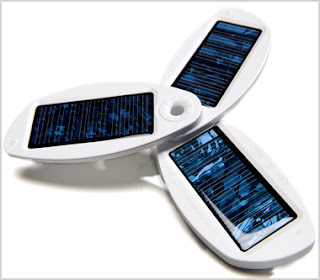
Ever have your phone die on you when you really need it? (I that has happened to me TOO many times) Well with a portable Solio solar powered phone charger that problem is solved. Now I know most of you are picturing some ugly clunky gadget, that takes days of sunlight to charge. But on average it takes 8-10 hours of light to fully charge the internal battery and with that power you can charge the average cell phone twice, if not more! Also with about an hour of charging, a phone can provide 25 minutes of talking and 10 hours of standby time. As for the design, it may be a little big for a pocket, but it would easily fit into a small purse/handbag and it only weighs 5.8 ounces. It comes in white so it's not to flashy or very noticeable. To start charging, you just have to fold out the 3 panels and away you'll go! Now this device doesn't only charge phones, there is an adapter for the Ipod too. And with every hour of charging, that will give you about an hour of music playback. Another thing to add about it is that there is an included wall adapter and USB cord to charge it like you normally would and it takes only 4 hours to fully charge. The price isn't cheap (at $99), but I would expect that as solar powered gadgets become more popular, the price will drop. I absolutely LOVE the idea and will probably get one (as soon as I get enough money). Click the link above to visit the website and see it for yourself.  Or check out Amazons description with customer reviews: Solio Solar Charger
Tell me, would you be willing to cough up $99 for a charger that takes on average 8-10 hours to charge? *With Direct Sunlight*

Update!: Just stopped by the T-Mobile Store today and I noticed that they were selling these!  Not only that, but at only $60 bucks, almost half of what you pay on the Solio website.  Also that there are many other adapters for other devices, like cameras and more!  So stop by your local T-Mobile store to check it OUT!