Subscribe:

Labels

Saturday, July 25, 2009

Want Free Music? Electronics? Video Games?

Search & Win

Okay you and I know that nothing is really free, but this program is pretty close. It's called Swagbucks (pretty catchy ain't it) and you get points that can buy all types of prizes. Now all you have to do to obtain points is simply use the search engine at the website. So as you use it regularly you will obtain points while you search. Now what is great about this is that both Google and Ask.com search engines are used. I always use Google when I am searching for something, so this is a really nice touch for me. Now when you create an account that you use with the website, you get three complimentary points. As you regularly use the website your points will slowly began to accumulate digital dollars (points) that can be used for buying a simple desktop wallpaper or maybe go all the way and get an iphone (which cost 3800 points).
Now if you have seen Mycokerewards.com, then this store is just like that, but with better prizes. Also this site is totally free, which is the best thing about it. No monthly charges or membership fees! My biggest problem about the store is that you aren't able to enter searches for anything in the store. But hopefully they will update the store and add that feature soon.
If this sounds even mildly interesting to you then sign up and search away. Now it plainly says on their website, when you sign up, that doing a large amounts of searches at one time will not really increase your chances of getting points, so just use it like you would Google or Yahoo and you'll be able to get what you want in no time. I am fairly new to this too, and only have 10 points, but I am getting some at least every other day. Now if you would like to sign up for it please click on the ad above because it will count as a referral from me. And once you start using it please keep me informed on how many points you have saved up. I'd love to see how much people can save. Thanks for reading and if you have any questions or comments, leave a post below and I will get back to you as soon as I can.


Monday, July 20, 2009

Need Blackberry Curve Help?


Hello everyone, haven't posted anything in quite sometime I know. I'm sorry about that but I'm a little more busy than I used to be, but I hope to keep this blog up a little more than I have.
Anyways, recently I was given a blackberry curve 8320 to replace my old phone and at first I was thinking that I didn't really need it, I'm not a business man. Though, after messing with it for awhile I realized that its more than just for a strict business man. Discovering the App World, made me think I was holding an Iphone. Sadly without a data plan (yes I don't have data plan with a blackberry, crazy right?) I can't access the store. On the other hand, I can still download many apps over the air and from my computer to my blackberry. While I was searching around I found that www.crackberry.com and www.blackberryforums.com were the most helpful to me. Crackberry has great helpful tips and tricks for first time blackberry users. I think it is great how the phone has shortcuts and I can set speed dial to every key! (except the function keys of course).
Now the device memory is very limited and it is a must to buy a micro sd card or else you will lose messages and your call logs. I bought an 8gb micro sdhc card from www.newegg.com for only $18. Usually I see those cards at prices near the hundreds.
Oh I almost forgot, I have encountered two problems with the phone. One that I fixed was with the camera, where I would get a black screen when i turn the camera on and had to take out the battery to get rid of. Another smaller, but annoying issue is that sometimes the phone's top speaker didn't make any sound. It comes and goes, hasn't happened to me in about a week.
That concludes my life with a blackberry, thanks for reading. If you have any questions about how I fixed my camera problem or any tips for me I'd be happy to read them.


Friday, May 1, 2009

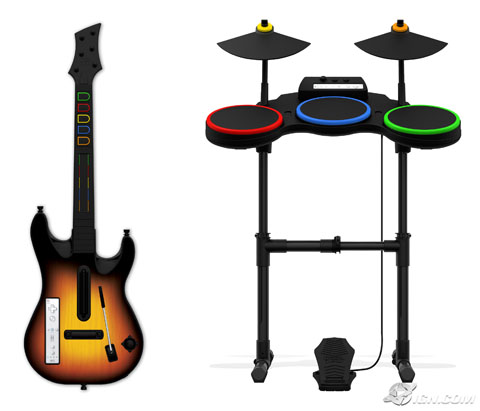
Broken Guitar Hero Drums Or Guitar?


Ever rocked out so hard on your plastic drums and/or guitar and then all of a sudden your whammy bar keeps sagging down, or maybe your red pad is unresponsive. Don't throw it away and spend $70 on a new guitar or even $100 on new drums, just take a visit to powertuneplus. Where for a little time and maybe a small price, you can fix those broken drums or guitar on your own. I know your thinking "well I can't fix anything to save my life!" Don't worry there are photos and written instructions for each step of the process to fix your problem. Before you get started mending things on your own, you should try and get your equipment replaced by Activision first (even if your 90 day warranty is up).
Now if you fail to replace your broken controller then please proceed to the website above and repair it yourself. What is nice about the website is that each repair guide is detailed with an estimated difficulty level and estimated time. For now there are only 3 guitar and 2 drum fixes that are addressed. As more problems are discovered, I'm sure more fixes will be found. All of the guides work for only Guitar Hero World Tour accessories, but one fix does work for the Guitar Hero 3 Les Paul guitar.
I haven't tried any of the repairs myself because I haven't needed to fix any of my guitar hero controllers, but I will definitely use the website if any problems occur. I believe that it is a great thing that I can easily and quickly find help on problems like this and I hope you use it to its full advantage. Thanks for reading and if you have any questions, leave a comment below.


Tuesday, April 21, 2009

Is You Mac Sluggish?


Man, remember that day you first powered on your macintosh computer and started using safari. The pages would load faster than you could blink. But sadly as time went on, you filled your computer with more and more files. Those files took up space, and now anything you do on your computer seems to take an eternity. Well nothing can act like new forever, but there are ways to bring your computer to a reasonable speed. Small things like deleting unneeded files, keeping your software up to date, and remembering to close applications after you are done using them; can help speed up everything. Of course this is just a brief list. More ideas on how you can quicken up your computer, is from Christopher Lee's post. I've been making sure my desktop is clean and I have noticed that closing my applications really does help with my speed. Hope this post was helpful to some people and if you have any questions just leave a comment.


Friday, April 10, 2009

Access To All The Games You Want In An Instant!


I'm not just talking about poorly made games that know one has heard of, I'm saying REAL GAMES such as Burnout Paradise, MLB 2k9, Crysis: Warhead, Bioshock and MORE! Picture yourself jumping across rooftops on Mirror's Edge and then your friend sends you a message about playing MLB 2k9, but you don't own the game. Pshh no need to get out of your chair, just purchase the game RIGHT THEN AND THERE! The game streams from their server to your OnLive console, so to experience high definition gaming, you need a good internet connection (the biggest pet peeve for me). I don't want to have to buy some expensive router just for OnLive, but I don't think anyone will have to or else the service wont sell.
Now a little more information about it is that the service works through Windows XP/Vista, Mac (Intel) computers and the OnLive console (of course). For playing on the computer you just need to download a (I'm hoping free) browser plug-in and that's it. The console seems to be very small from photos i've seen (even smaller than the controller itself) and has two USB ports for controllers, keyboard, or even a mouse. It also supports up to four wireless controllers and four bluetooth headsets, which makes for simple gaming. The controller reminds me of the xbox 360's, but without the middle xbox guide button. The four buttons on the top right spell out LIVE, which is kind of nice because it is a word you can remember in your head to help you get used to the buttons.
So, even though I wont be waiting in line to get this exceptional creation, I will be trying it out whenever I get the chance at a local best buy, or my friends house. Anyone interested in trading in their trusted Sony PS3 or Microsoft Xbox 360 for this new idea? Leave comments below. Also if you want to check out the website here's the link: OnLive and if you REALLY like this product then sign-up for the beta program, and try it out on your computer (I don't think you can test the console itself yet), but for those who love their keyboards and mouses (or mice) then sign right up. They start selecting testers in the summer, so hurry up. There's no telling how many people they will accept.


Sunday, April 5, 2009

Use A Touchscreen's Keypad Without Looking


I've always thought that touchscreen phones were one of the greatest ideas ever thought of, but one thing every phone lacks, is the physical buttons.  Without actual buttons being there, it is impossible to type things without looking at the screen, like a person's phone number for instance.  Well people at Google have been working on an idea to solve that problem.  This idea started when they realized that there were many visually impaired people that used touchscreen phones everyday and that there needed to be more accessible controls towards them.  
So the concept is that wherever you touch the screen, it turns into a five.  Next just press/hold the screen and slide up for 2, or right for 6, or diagonal to 1 or 3, etc.  The phone will not only recognize the input, but also read out the number so you can make sure it's the correct number.  It sounds like a fairly easy thing to do for me and as long as you know the number keypad configuration you will be set (I'm sure everyone already knows it).  
I like how they are making sure that there phone can be used by anyone.  As far as I know Google is the only company working on concepts like this, but who knows Apple could be working on something like this behind closed doors.  I'm not sure if this feature will be coming out anytime soon, or if at all, but if it does I want to be one of the first to try it out.  Check out the video above to see it for yourself.


Friday, April 3, 2009

Beautifully Designed Headphones, But Worth The Price?


First off, I'm sorry its been 4 days since my last post.  I've been really busy and haven't had time to create posts.  Now back to the main reason I started this post, these headphones are called Beats By Dr.Dre (created by Monster).  They are the style of headphones that cover your whole ear and from the reviews I've read, they are significantly better than expected.  It took seven years for Dr.Dre and Monster to create these headphones.  All that I've heard about them is that they produce amazingly clear sound.  No matter if you're listening to rap, rock, or your grandfathers music.  The bass is said not to distort the music and even songs without bass, sound great.  Along with the headphones, 2 cables come with it, a normal sized cable and one compatible for the Iphone (3.5mm).   Thankfully these headphones were designed with the Iphone in mind because the Iphone cable has an integrated microphone, and a pause button to stop music when A call comes up.  As for the noise canceling, they are comparable to Bose Quiet Comfort Headphones.  Now for the moment you've been waiting for the cost of these headphones is: $349.00 DOLLARS.  No I didn't misplace the decimal point.  Now in my opinion I wouldn't really think about spending more than $70 bucks for a pair of headphones, but I can understand some people wanting to have great noise canceling headphones, especially ones that work as a phone headset.  I haven't ever seen these in person, so I can't exactly judge to see if they are worth the price.  Would you buy these headphones?  Would you even think about buying any headphones at such a price?  Check them out at this link: Beats By Dre or head over to amazon to see their description with customer reviews: Beats By Dre Amazon  Leave your reasons in comments below.


Sunday, March 29, 2009

Like Video Games, Movies, Books, Or Music CD's?


Then Swaptree.com is the place for you.  I found out about this site on Yahoo.com and thought it was a great idea.  In a way, it's like ebay or craigslist.  You post all of the games, books, cd's, and movies you are willing to trade.  You do this by typing in the UPC or ISBN code on the item (its the scanner number, on most things).  
After you put in the items you have, now is the FUN PART!  Finding all of the things you want, add as many things as you'd like.  After that, you just sit back and wait for swaptree to find someone who has an item you desire.  It took about a day for me to receive an email notification of a potential trade, but for some people trades could be found INSTANTLY.  What's really cool about it, is that it is not always a trade between two people, sometimes you will get three way trades.  So the person you are getting the item from is not the same person you ship the item to.  I like how it is smart enough to create trades like that.  Swaptree looks all around the U.S for people to barter with and so that just makes the chances of you getting what you want THAT MUCH GREATER.  
Shipping is very quick and easy because you can print out the shipping label at home (no special paper or ink needed).  So far i've done one trade and sent the game to Spokane, Wa and it cost $2.74 for the label.  Even though I had to go to the store to buy packaging for the game, I still found it rather easy to do.   It cost me only $2 (it was a bigger game case), normally packaging would've cost me a dollar.  So $3.74 to send the game seems pretty reasonable to me.  I'm in the process of another trade where I'm sending a game to Pennsylvania and the label cost me the same thing ($2.74).  
A little more information about the site is that it cost you a dollar a month (for label and tracking fees).  And of course you don't have to use their shipping labels, it's just a simple method that is provided.  Also you don't have to accept every swap that is offered to you, but one thing about rejecting too many trades is that swaptree will limit the amount of swap's it finds for you in the future.  So if you go on a vacation, you can just pause your account and you wont have to deal with any of that.  Click the link above to to visit the site and see it for yourself.
So far, I'm liking the site and it is very straightforward and I hope that you find it to be that way too.  Have questions/problems?  Write it in a comment and I'll try my best to answer it.
Update: Just received my first game.  It was really quick!  Was not expecting it today.  So just letting you know people on this site can be trusted.